Intel Arc Pro SR-IOV vGPU on Proxmox: What It Means for Setup and VMs
Intel Arc Pro SR-IOV vGPU on Proxmox: how one card splits into up to seven virtual functions, the kernel and BIOS setup, and what vGPU still cannot do.
Overview
Yes. An Intel Arc Pro card can now be shared across several Proxmox VMs through SR-IOV vGPU. Recent Intel Arc Pro drivers (version 32.0.101.8314) appear to enable this support, exposing up to seven virtual functions on supported cards like the B-series. For Proxmox users this matters because it gives them a realistic alternative to NVIDIA's licensed vGPU stack, especially in homelabs and small environments.
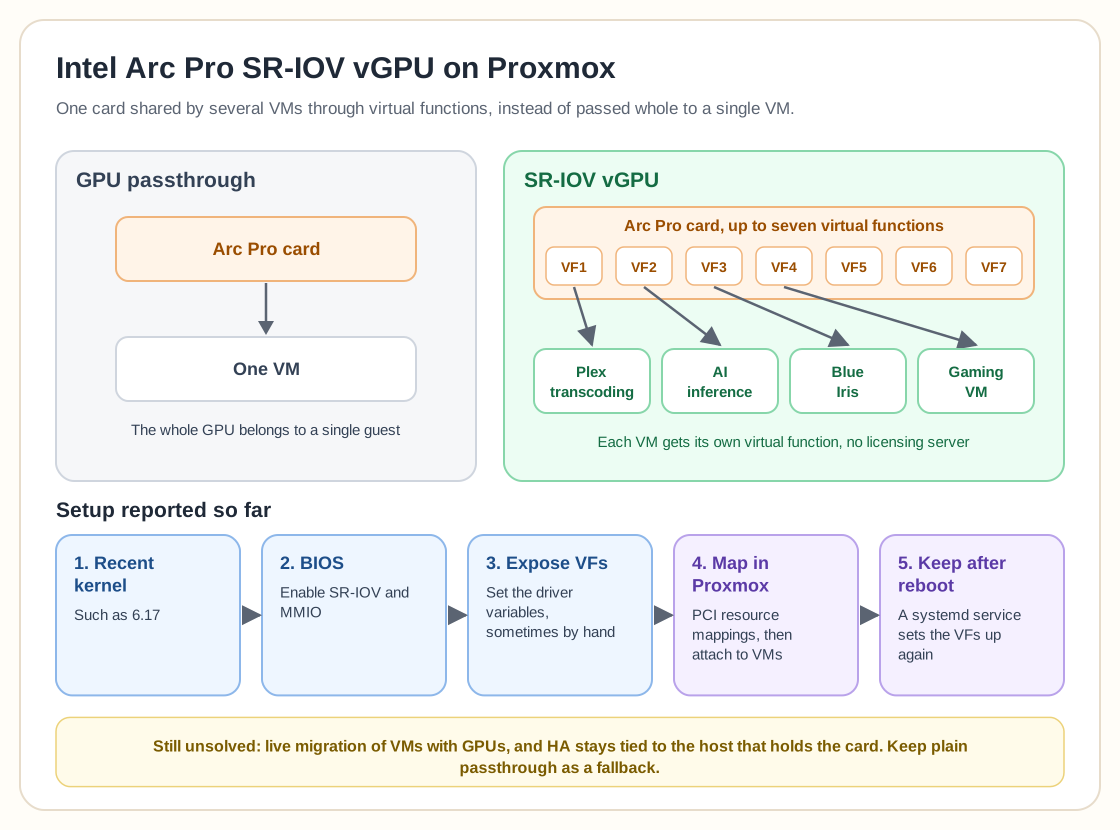
With SR-IOV, the card presents several virtual GPUs, so you no longer have to pass the entire GPU through to a single VM. Each VM can get its own virtual function and share the physical hardware. One Arc Pro card could then run several workloads, such as Plex transcoding, AI inference, Blue Iris video analysis, or even gaming VMs, without handing the whole device to one guest.
Setup isn't fully plug-and-play yet. Most reports say you need a recent kernel such as 6.17, have to enable SR-IOV and MMIO in the BIOS, and sometimes have to expose the virtual functions by hand by setting the right driver variables. You can then add those virtual functions in Proxmox under PCI resource mappings and attach them to VMs. Some users noted that the exposed VFs don't persist across reboots unless a systemd service sets them up again. Firmware updates may still need Windows until Linux support matures.
vGPU also differs from simple passthrough in what it leaves unsolved. You still need a correct driver configuration, and it doesn't automatically make live migration possible for VMs with attached GPUs. High availability is still limited by which host physically holds the hardware.
Homelabbers have the most to gain, because NVIDIA's vGPU licensing has long been the biggest obstacle to running shared-GPU workloads cheaply. NVIDIA's vGPU software needs paid licensing even on consumer-adjacent hardware, and the workarounds (community patches that unlock vGPU on unsupported cards) sit in a legal and stability gray area. Intel Arc Pro exposes SR-IOV natively, with no licensing server or subscription, using a standard PCIe virtualization feature where NVIDIA relies on a software license.
The use case getting the most attention is the mixed-workload homelab. One Arc Pro card handles Plex or Jellyfin hardware transcoding for several simultaneous streams, while another virtual function on the same card runs a lighter AI inference workload, with no second physical GPU and no whole card tied up by a task that doesn't need it. It's less clear this early whether that holds up for heavier work (serious AI training, GPU-intensive gaming VMs), since most public reports so far cover transcoding and light inference.
The feature is new and depends heavily on the kernel version, so expect rough edges. Before you commit production plans to it, check that someone has reported your exact Arc Pro model and driver version working together. Keep standard GPU passthrough to a single VM in mind as a fallback in case SR-IOV turns out to be unstable on your hardware and kernel.
Even with those caveats, it is real progress toward affordable, officially supported GPU sharing on Proxmox without proprietary licensing.
Need help with Proxmox?
Use the form below to get in touch about migrations, troubleshooting, and Proxmox design work.