Search Proxmox Community Scripts with SearXNG
Search about 480 Proxmox community scripts from your own SearXNG with !pve. Cached catalogue, offline private queries and a three step install.
Overview
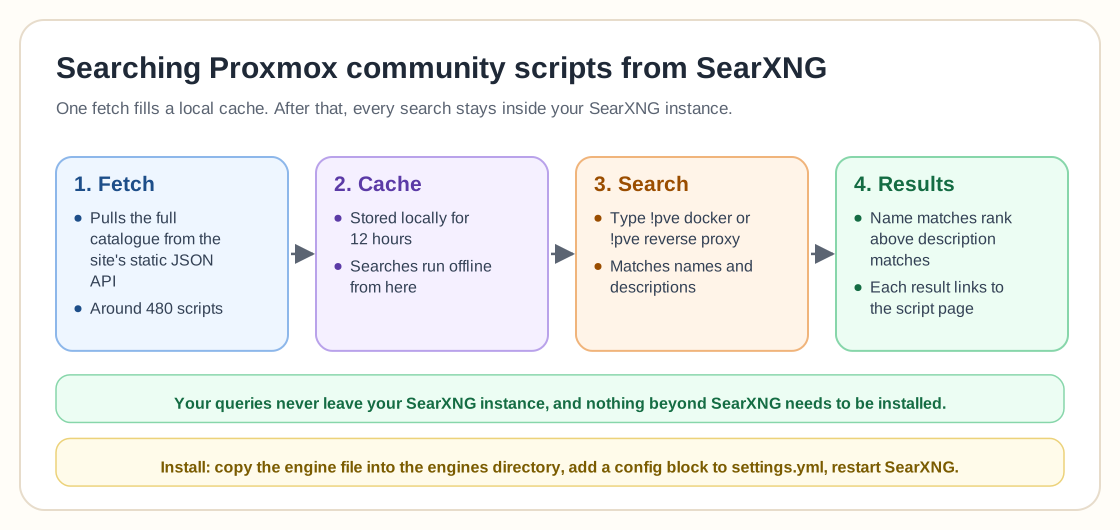
This custom SearXNG engine lets you search the full Proxmox community scripts catalogue, around 480 scripts, directly from your self-hosted SearXNG instance.
You no longer have to browse the Helper Scripts website to check whether an LXC template or automation script already exists. A shortcut like `!pve docker` or `!pve reverse proxy` in your search bar does it. The engine searches both script names and descriptions, which helps because many project names say little about what the project does.
Under the hood, the engine fetches the entire catalogue from the site's static JSON API and caches it locally for 12 hours. After that, all searches run offline, so your queries never leave your SearXNG instance. It uses the same scoring logic as the community scripts site and ranks name matches above description matches. Results link directly to the matching script page, and nothing beyond SearXNG itself needs to be installed.
Installation takes three steps:
1. Copy the engine file into your SearXNG engines directory. 2. Add a short configuration block to `settings.yml`. 3. Restart SearXNG.
It also works with SearXNG deployed through the community scripts LXC.
For homelab users, it turns finding a script into a quick, private search instead of several clicks through a website.
Need help with Proxmox?
Use the form below to get in touch about migrations, troubleshooting, and Proxmox design work.