Fix Proxmox Multicast for DLNA Discovery in a VM
Proxmox multicast troubleshooting for DLNA: check the vmbr0 bridge, VLAN tags, snooping and firewalls so Jellyfin or miniDLNA shows up on your LAN.
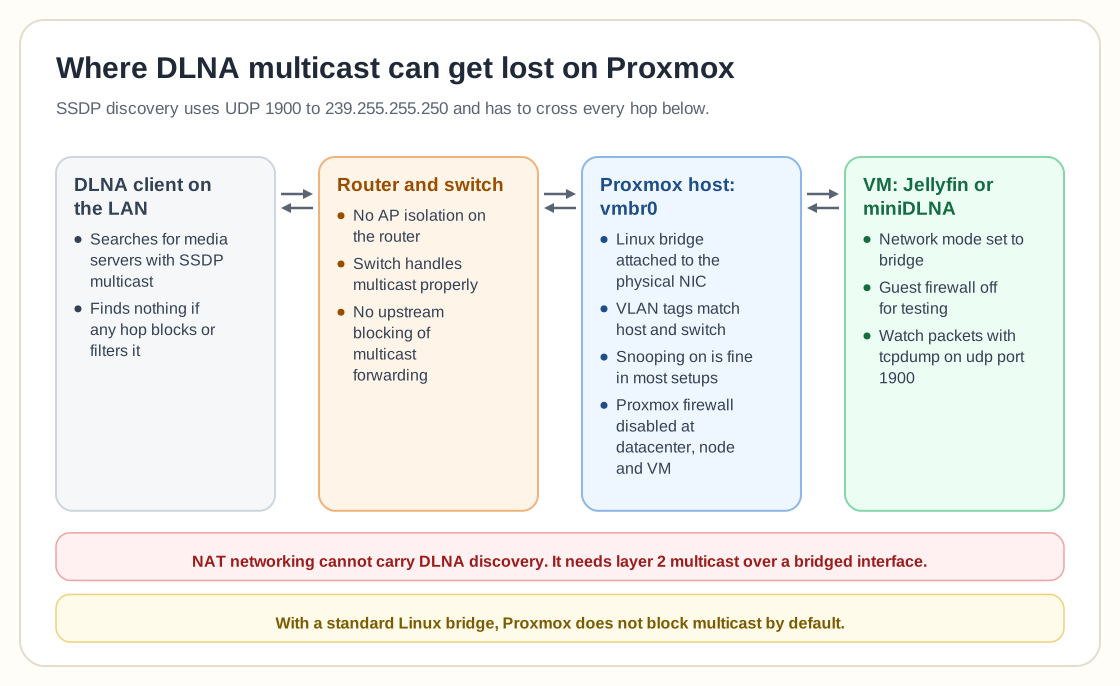
The problem: DLNA not discoverable on the LAN
After migrating to Proxmox, a DLNA service running inside a VM may not appear on the local network. SSDP multicast packets may not propagate correctly even with a bridged interface and the firewall disabled.
DLNA relies on multicast (UDP 1900, 239.255.255.250) for device discovery. If multicast traffic is blocked, filtered, or bridged incorrectly, clients won't find the media server.
What to verify
- VM uses a Linux bridge (vmbr0) attached to the physical NIC
- No VLAN tagging mismatch between host and switch
- Multicast snooping configuration on vmbr0
- Firewall disabled both inside VM and at Proxmox datacenter level
- No upstream router blocking multicast forwarding
How multicast snooping works
Multicast snooping decides how multicast traffic is distributed across bridge ports.
- Enabled: Only ports requesting multicast traffic receive it (efficient and recommended).
- Disabled: Multicast is flooded to all ports.
In most Proxmox setups, multicast works correctly with default settings. Disabling snooping is typically unnecessary and may not resolve discovery issues.
Step-by-step troubleshooting
- Confirm VM network mode is bridge , not NAT.
- Make sure the Proxmox firewall is disabled at Datacenter → Node → VM.
- Temporarily disable the firewall inside the guest OS for testing.
- Verify multicast packets using: tcpdump -i <interface> udp port 1900
- Confirm your router does not isolate clients (AP isolation).
- Check that your physical switch supports multicast properly.
Frequently asked questions
Does Proxmox block multicast by default?
No. With a standard Linux bridge configuration, multicast works out of the box.
Should multicast snooping be disabled?
Usually not. It improves efficiency and rarely prevents DLNA discovery in default configurations.
Why does DLNA work on bare metal but not in a VM?
The cause is usually the bridge configuration, firewall filtering, VLAN segmentation, or upstream network equipment.
Can NAT networking support DLNA?
No. DLNA requires layer-2 multicast discovery and must use a bridged network interface.
Need help with Proxmox?
Use the form below to get in touch about migrations, troubleshooting, and Proxmox design work.