Proxmox snapshots vs PBS backups: what differs and when to use each
Proxmox snapshots give instant local rollback. PBS backups give deduplicated, off-host recovery. Learn what differs, when to use each, and storage limits.
Overview
Proxmox snapshots and Proxmox Backup Server (PBS) backups do different jobs, even though you can restore from both.
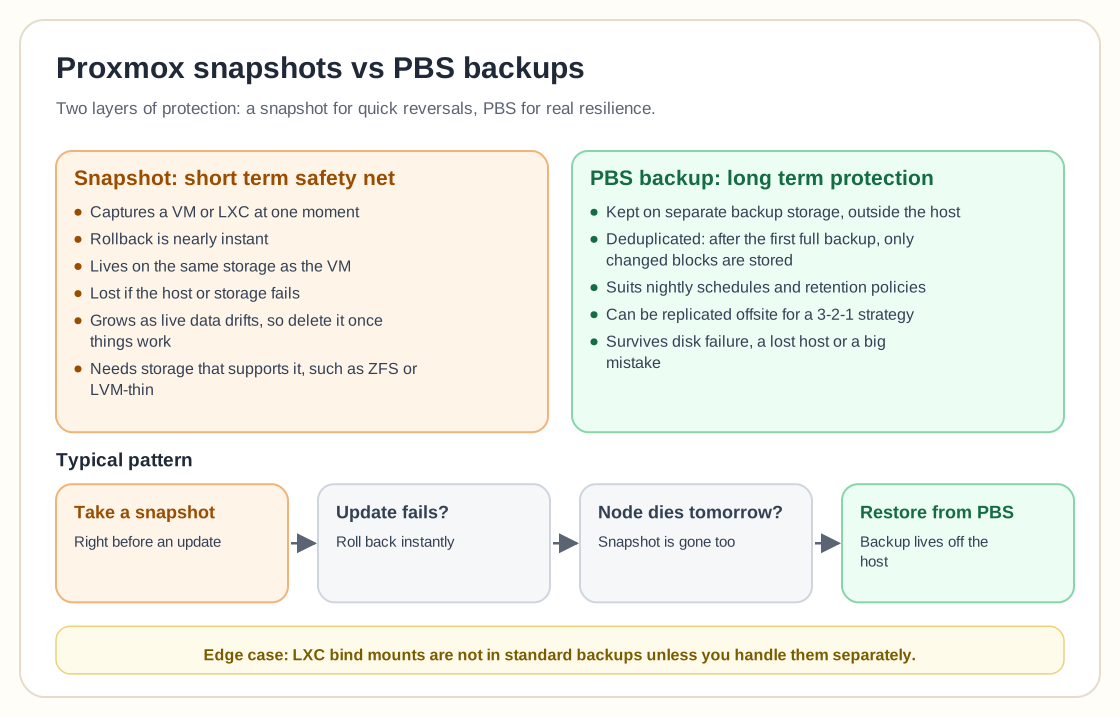
A snapshot is immediate and local. It captures the state of a VM or LXC at a specific moment, usually right before a risky change like an upgrade or a configuration edit. If something breaks, rolling back is nearly instant, which makes a snapshot a short-term safety net. Snapshots live on the same storage as the VM, so they don't protect you from a disaster. If the host or storage fails, the snapshot is lost along with it. Use them temporarily and delete them once you've confirmed everything works.
PBS backups are long-term protection kept outside the host. They sit on separate backup storage and use deduplication. After the first full backup, only changed blocks are stored, so frequent backups don't take much space. PBS suits nightly schedules, retention policies, and offsite replication, and it protects you from disk failure, losing the host, or a catastrophic mistake.
Several experienced users describe the same pattern:
- Snapshot before change. - PBS for recovery.
For example, take a snapshot before updating a service. If the update fails, roll back instantly. If the whole node dies tomorrow, restore from PBS.
There are some edge cases. Bind mounts in LXCs aren't included in standard backups unless you handle them separately, and some people run extra PBS client jobs for host-level folders. Others replicate PBS storage offsite to follow a 3-2-1 backup strategy.
Snapshots also depend on the storage type. They work natively on ZFS, LVM-thin, and a handful of other storage backends, but not on plain LVM or on directory storage without qcow2 disks. If your VM's storage can't do snapshots, Proxmox simply won't offer the option. If instant rollback matters to your workflow, that missing option is a good hint to rethink your storage layout.
Leaving snapshots in place for a long time also costs real disk space. A snapshot pins the original data blocks so you can roll back to them, so disk usage grows as the live data drifts away from the snapshot point, sometimes by a lot, depending on how much the VM writes. That is the main reason snapshots are meant to be temporary. One left in place for months can take up far more space than you expected and, in the worst case, fill the underlying storage pool.
In short, snapshots are for quick reversals and PBS backups are for real resilience. You use both, each for a different layer of protection.
Need help with Proxmox?
Use the form below to get in touch about migrations, troubleshooting, and Proxmox design work.