Proxmox filesystem went read-only with I/O errors: fixing it without reinstalling
Proxmox filesystem went read-only with I/O errors? Find the failing drive with SMART, dmesg and zpool status, then fix it without reinstalling.
Overview
When a Proxmox host starts throwing I/O errors and remounts its filesystem as read-only, nearly everyone agrees the cause is almost always hardware, and only rarely a software glitch. That means you can usually fix it without reinstalling.
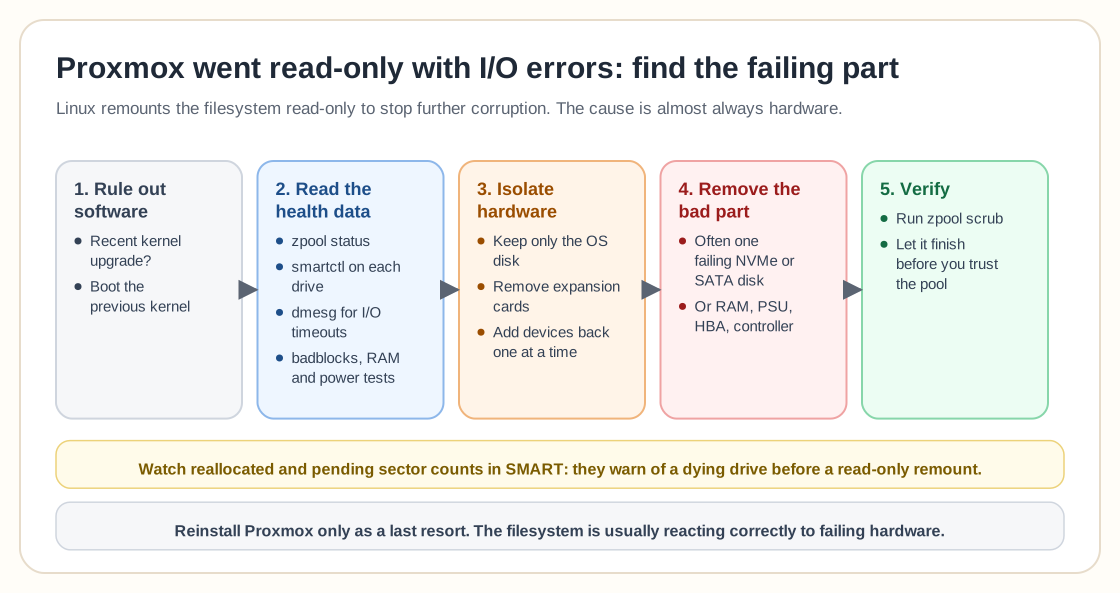
People often suspect recent updates first, especially kernel upgrades, and booting into a previous kernel is a reasonable first step. If the problem survives reboots or affects several disks, though, attention quickly moves to hardware. The usual suspects are failing drives, unstable power supplies, faulty RAM, controller problems such as a bad HBA or PCIe-to-SATA card, or wider motherboard trouble.
In cases like this, the breakthrough usually comes from isolating components. Disconnect nonessential drives, remove expansion cards, and test with only the OS disk and minimal hardware attached. If the system stabilizes, add devices back one at a time. This often turns up a single failing disk that was dragging the whole system into I/O failure.
The final answer is often what experienced admins expect, a dead or corrupted drive. Removing the failing NVMe or SATA disk brings stability back immediately, especially when no critical data lives on it. Linux protects data integrity aggressively: when it detects serious I/O faults, it remounts filesystems read-only to prevent further corruption.
If this happens to you, start with hardware diagnostics:
- Check SMART data. - Run badblocks if possible. - Inspect dmesg logs for repeated I/O timeouts. - Test RAM and power stability.
On ZFS, run `zpool status` first. It flags a degraded or faulted pool right away and often names the exact device causing errors, which saves you from physically disconnecting drives one at a time. `smartctl -a /dev/sdX` (from the smartmontools package) gives a detailed health readout for each drive, including reallocated and pending sector counts. Both counts are strong signs that a drive is about to fail, well before a full read-only remount happens.
After you've found and removed or replaced the failing component, verify the filesystem itself before you trust it again. On ZFS, run a `zpool scrub` and let it finish. It checksums every block against known-good copies and will surface any corruption that happened while the faulty hardware was in use, even after the bad drive is gone.
Reinstall Proxmox only as a last resort. Most of the time the filesystem is reacting correctly to a failing component and is not malfunctioning on its own.
Need help with Proxmox?
Use the form below to get in touch about migrations, troubleshooting, and Proxmox design work.